Sensory Diversity
  • Home
  • Blog
  • Neurodivergence
    • What is Autism?
    • What is ADHD?
    • What is Sensory Integration / Sensory Processing Disorder?
    • What is Misophonia?
    • What is Misokinesia?
  • Sensory Lifestyle
  • Sensory DIY
  • 0
4993472
CopingSensory Beauty

My Sensory-Safe Beauty Products

by Sensory Diversity April 28, 2025
written by Sensory Diversity

This article is based on my opinion, and is not meant to be a one-size-fits all approach. Personally, I am super sensitive to products, and as a person with sensory issues (texture, weight, sound, scent), I’ve had a hard time finding products that work for me. I’m also a girly girl, so I’ve spent a lot of time (like 10 years) trying to find products that I love that make me feel better, feel pretty, or simply help me relax. The Glow Recipe products do have some scent, but for me they are very light and enjoyable. The Soli-notes vanilla is a perfume, but made very naturally. I do find it best to put it on clothes and not my body. The inkey list moisturizer has no scent whatsoever and feels amazing to wear. *Note these are affiliate links of which the IMF earns a small commission.* Please note that the link will automatically go to your country of origin’s site. If the product is not in your country the link may not work!

Glow Recipe PHA + BHA Face Toner – $35 USD

When I’m stressed and anxious I wear the Glow Recipe Watermelon Toner because it makes my skin feel cool and relaxed. It’s honestly a little bit pricey (about $35 US), but I love it enough that I continue to re-purchase it. I’m not sure what it does for “skincare”, but I love the cooling sensation and scent.

Glow Recipe Watermelon Glow Facial Spray + Hydrating Mist -$29 USD

Like the toner, the watermelon glow spray is a scented spray that gives a refreshing feeling. I tend to use this as a way to “spray water on my face” type deal while my fight-flight is high. It’s a bit of an expensive thing to use for this, but I do think that the scent and feel are worth it to me. I also like that it’s Korean clean beauty and doesn’t make me break out.

SOLINOTES Vanilla Perfume for Women -$44 USD

This is one of my FAVOURITE perfumes in the world. I do find it’s a little much to be on the skin, so I put it on my clothes and hair. It calms me down immediately. As a gourmand/vanilla lover, this one is essentially the best vanilla I’ve ever smelled in a clean brand.

The INKEY List Bio-Active Ceramide Moisturiser -$20 USD

I turned 31 this year, so ceramides and moisturizing are super helpful. I am also a sensory seeker when it comes to face products, and I LOVE a thick thick thick moisturizer. If you don’t, then do not get this! It’s very thick, and super hydrating and lovely. It has no scent, which is great if you’re sensitive to scents on your face.

… Also, as a bonus, what’re you listening to lately? For me it’s been “I Love You, I’m Sorry” by Gracie Abrams… this song just touches my ears perfectly.


April 28, 2025 0 comments
0 FacebookTwitterPinterestEmail
wcrqkjgmpfi
CopingDeveloper AccessibilityGamingUI Accessibility

Misophonia Video Game Mods

by Sensory Diversity April 9, 2025
written by Sensory Diversity

Misophonia mods for video games have become more common, and we’re absolutely delighted. This list aims to highlight mods that help misophonia for your favourite video games, most commonly removing unpleasant sounds from popular games.

  • Misophonia Accessibility (Stardew Valley)

    • Description: This mod removes the sound when eating solid food to help those who find that sound irritating. It can also remove drinking and keg sounds, configurable through the in-game settings or the config.json file.​

    • Link: Misophonia Accessibility on Nexus Mods

  • Misophonia Friendly (Stardew Valley)

    • Description: Specifically targets and removes the drinking sound from Stardew Valley, providing relief to players sensitive to this particular audio cue.​

    • Link: Misophonia Friendly on Nexus Mods

  • Misophonia Friendly (Valheim)

    • Description: Mutes misophonia-triggering sounds in Valheim, specifically the sounds of puking and eating.​

    • Link: Misophonia Friendly on Nexus Mods

  • Misophonia Sounds Replacer (Skyrim Special Edition)

    • Description: Replaces the player’s eating and drinking sounds in Skyrim. The drinking sound is modified to remove the gulping noise, and the eating sound is replaced with a generic pickup sound.

    • Link: Misophonia Sounds Replacer on Nexus Mods

  • Misophonia – Silent Nature (Skyrim Special Edition)

    • Description: Mutes ambient nature sounds such as birds, cicadas, and crickets in Skyrim. Designed to work with the Dawnguard DLC.

    • Link: Misophonia – Silent Nature on Nexus Mods

  • No Eating Sounds (Subnautica)

    • Description: Removes eating sounds in Subnautica, catering to players with misophonia.

    • Link: No Eating Sounds on Thunderstore

  • No Eating Sounds Experimental (Subnautica)

    • Description: An experimental version of the “No Eating Sounds” mod for Subnautica, aimed at removing eating sounds to assist players with misophonia.

    • Link: No Eating Sounds Experimental on Thunderstore

  • Anti Misophonia Addon (Amnesia: Rebirth)

    • Description: Silences the character Tasi’s fear effect sound when scared in the dark or outside in the sun, which can trigger misophonia in some players.

    • Link: Anti Misophonia Addon on ModDB

  • Sounds Be Gone! (Minecraft)

    • Description: Inspired by the creator’s own experience with misophonia, this mod allows players to disable any in-game sound, whether from the vanilla game or other mods. When an undesirable sound is heard, pressing the designated key (B for Minecraft 1.20 and above) brings up a menu to mute that sound permanently.​

    • Link: Sounds Be Gone! on Modrinth

  • Silent Eating and Drinking for Misophonia (ARK: Survival Ascended)

    • Description: This mod silences player eating and drinking sounds and visual animations, catering to players with misophonia and similar sound sensitivities. It also modifies other sounds, such as drowning-suffocation and pooping during bed travel, to create a more comfortable gaming experience.​

    • Link: Silent Eating and Drinking for Misophonia on CurseForge

Thank you to these modders for making gaming more accessible!

April 9, 2025 0 comments
0 FacebookTwitterPinterestEmail
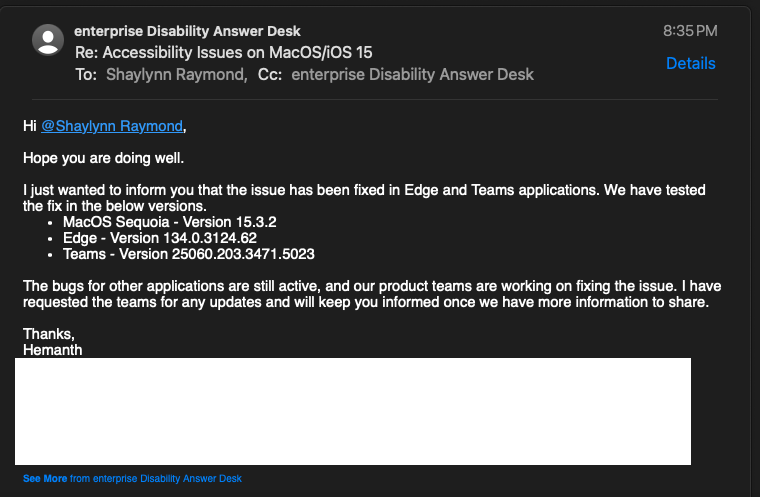
Screenshot 2025 03 17 at 9.04.28 PM
AdvocacyUI Accessibility

Microsoft Teams and Edge now Honour “Prefers Cursor Non-Blink” on Mac

by Sensory Diversity March 17, 2025
written by Sensory Diversity

Shaylynn Hayes-Raymond, and the International Misophonia Foundation have been working with the accessibility/disability department at Microsoft to advocate for the blinking text cursor (caret |) to respect system settings on Mac and the apple mobile operating system. Windows versions of these apps already honour this program setting. Microsoft has reached out to let us know that they have implemented this change in Edge and Teams with more programs to come in the future.

We are pleased at these changes and anxiously await changes to important programs such as Office and Excel, where much of the distress is seen on a daily basis for office workers, students, and others who must use office suites.

For many with sensory disorders, misokinesia, autism, ADHD, and more, the blinking text cursor can cause an aversive reaction.

March 17, 2025 0 comments
0 FacebookTwitterPinterestEmail
d2jfhcj7t o
CopingTeens

Coping With Misophonia for Teenagers

by Sensory Diversity March 5, 2025
written by Sensory Diversity

Parents of teenagers with misophonia might be confused by what a reasonable accommodation is and worried that if they over-accommodate their teen will not be prepared for the “real world” outside of the home. These concerns are understandable from a parenting perspective that often considers behavior as the main parenting concern. However, research such as a 2019 study by Porcaro et al. suggests that misophonia accommodations are beneficial in a university setting. In an interview in 2023, Dr. Danesh, who was an author of the study, expressed that he sees no issue and no harm in accommodations for misophonia in his work with the college-age population.

Accommodations for misophonia in the home should be balanced between respect for other family members and helping the teen with misophonia to cope in the environment that should be safest for them. Since sensory information is cumulative, the one place where persons with misophonia can feel safe is often their own bedroom or home.

Cognitive behavioral therapy (CBT) has been shown to help manage the emotional impact of misophonia, but one must remember that this is about after the misophonia moment as there is currently no treatment for the disorder that can alleviate the misophonic fight-flight-freeze response entirely. Coping skills such as CBT, sensory regulation, and mindfulness are an important part of mitigating the distress caused by misophonia. Teenagers with misophonia may need extra time doing homework, fewer extracurriculars so that they have more time to self-regulate, and may need to learn communication skills to manage outbursts at family members during misophonic triggers. It may be helpful to consider online options for university as a way to manage future distress from misophonia, but this depends heavily on the needs of the individual teen.

In a 2018 article, Dr. Jennifer Brout, a psychologist with misophonia, noted that “adolescence is difficult for the individual, and it is equally as daunting for parents. Misophonia can certainly make this already ‘stormy’ time worse for everyone. However, helping your teenager make some adjustments within daily routines and regarding social events can go a long way. Demonstrating understanding and patience when your adolescent is behaving in ways that concern you is not necessarily ‘indulgent.’ Teens with misophonia often need their parents’ guidance and support for a bit longer than others.”

Learn more about classes for teenagers with misophonia here: https://misophoniafoundation.com/teen-class/

While misophonia is hard to live with and can be very overwhelming for both parents and teenagers, the misophonia will likely wax and wane over time, rather than remain at a heightened level. One should remember that teenagers in general experience more stress and hormonal changes even without misophonia present, so having patience with the teen is an important part of managing family challenges.

The International Misophonia Foundation provides a list of resources for teenagers with misophonia as well as helpful advice for parents managing their teen’s misophonia including classes specific to teenagers.

If you’re the parent of a teenager with misophonia, rest assured that while this is not easy, focusing on coping skills can help alleviate much of the distress from misophonia. Coping with misophonia is not linear, and thus it’s important to take perspective when it comes to coping as a whole. Some days will be easier than others.


March 5, 2025 0 comments
0 FacebookTwitterPinterestEmail
Close-up of a black and white Apple logo on a desktop screen with a modern minimalist design.
AutismAwarenessMisokinesiaMisophoniaUI Accessibility

Letter to Apple from Shaylynn Hayes-Raymond: Urgent Accessibility Concerns Regarding Spinning Cursors and Motion-Based UI Elements in Apple Operating Systems

by Sensory Diversity January 31, 2025
written by Sensory Diversity

Urgent Accessibility Concerns Regarding Spinning Cursors and Motion-Based UI Elements in Apple Operating Systems

To Whom It May Concern,

I am writing to formally raise concerns regarding the accessibility of Apple’s macOS, iOS, iCloud, and associated applications for individuals with sensory processing disorders, including autism, misophonia, misokinesia, ADHD, and sensory processing disorder (SPD). As the Director of The International Misophonia Foundation and a Licensed Counselling Therapist-Candidate in New Brunswick, I advocate for individuals affected by these conditions, and it has come to my attention that various motion-heavy UI elements in Apple’s ecosystem create significant sensory distress for neurodivergent users.

One of the most overwhelming and disabling elements in Apple’s interface is the spinning cursor (beachball/pinwheel) and loading indicators, which appear frequently throughout the operating system, including:

•On startup when the Mac is loading.

•In applications when processing or unresponsive.

•On iCloud Pages and other web-based services.

• During system updates and restarts.

These spinning elements may appear harmless to the general population, but for neurodivergent individuals, they can cause severe sensory overload, migraines, anxiety, and fight-or-flight responses (Robertson & Simmons, 2013; Kumar et al., 2017). Specific concerns include:

• The unpredictability of the spinning cursor creates extreme distress for individuals with ADHD, SPD, and autism, who struggle with uncertainty, repetitive motion, and lack of control (Ben-Sasson et al., 2009).

• Pinwheels, spinning cursors, and animated loading indicators contribute to sensory overstimulation and visual fatigue, which can trigger migraines and neurological discomfort (Marcus et al., 2016).

• Misophonia and misokinesia sufferers experience extreme emotional responses, including rage, discomfort, and distress when confronted with spinning visual stimuli (Schröder et al., 2019; Williams et al., 2021).

These UI elements violate Apple’s own commitment to accessibility and fail to adhere to WCAG 2.1 Guidelines, which require that users be provided with options to disable motion-based elements that cause sensory distress (Success Criterion 2.3.3 – Animation from Interactions).

Recommendations for Improvement:

1. Provide an option to replace or disable the spinning beachball and loading indicators with a static progress bar or discreet text-based status updates.

2. Reduce excessive reliance on pinwheels and animated spinners by using subtle, non-distracting UI elements to indicate system activity.

3.Improve system responsiveness to reduce the need for extended loading indicators.

4. Allow users to customize their experience by introducing a “Low Sensory Load” mode in macOS and iOS Accessibility settings.

5.Consult with sensory disorder advocacy groups to refine accessibility features for neurodivergent users.

Apple has been a leader in accessibility, but this issue remains a significant barrier to inclusion for neurodivergent individuals. I urge Apple to take immediate action to provide a less intrusive, sensory-friendly alternative to spinning cursors and pinwheels.

Sincerely,

Shaylynn Hayes-Raymond, LCT-C (New Brunswick)

Director, The International Misophonia Foundation

January 31, 2025 0 comments
0 FacebookTwitterPinterestEmail
AwarenessDeveloper AccessibilityUI Accessibility

The Blinking Cursor (Text Caret) is an Overlooked Accessibility Barrier in Software Development

by Sensory Diversity January 31, 2025
written by Sensory Diversity

The Blinking Cursor: An Overlooked Accessibility Barrier in Software Development

For most software developers, the blinking cursor in code editors and Integrated Development Environments (IDEs) is an expected, even unnoticed, part of their daily workflow. Yet, for individuals with sensory processing disorders, visual sensitivities, and other neurodivergent conditions, the inability to disable this constant flicker presents a significant barrier to accessibility.

The Problem with the Blinking Cursor

The blinking cursor has been a staple of text-based interfaces for decades, intended to signal where text input will appear. However, this seemingly minor design choice can be highly disruptive for some users.

  • Sensory Overload: People with sensory processing differences, such as those with autism or misophonia, can find the flickering motion distracting or even distressing. Constantly shifting visual elements can create cognitive fatigue and impede focus.
  • Photosensitive Conditions: Some individuals with epilepsy, migraines, or other neurological conditions may be triggered by repetitive flashing patterns, no matter how subtle.
  • Attention and Processing Differences: Developers with ADHD or other attention-related conditions may struggle with maintaining focus when an element of their screen is repeatedly drawing their eye.
  • Lack of Customization: While many accessibility-conscious applications allow for font size changes, dark mode, and other user-friendly options, most coding environments do not offer a way to disable or adjust the blink rate of the cursor.

Ableist Design in Software Development

The exclusion of an option to disable the blinking cursor is a prime example of ableist design—when technology is built primarily for neurotypical or able-bodied users, disregarding those with different needs. The lack of awareness in mainstream development environments is reflective of the broader issue of ableism in tech, as discussed in the article Agile Development: Ableist Extroverts Setting Agendas (Tameri).

Agile development, for example, often favors fast-paced, highly collaborative processes that do not accommodate neurodivergent thought patterns, sensory needs, or working styles. The unwillingness to implement small but meaningful accessibility options, such as disabling the blinking cursor, reveals a deeper bias: the assumption that all developers work in the same way and have the same needs.

A Call for Change

It is time for software development tools to incorporate better accessibility options, including:

  • Cursor Blink Rate Settings: Users should be able to reduce the blink rate or disable the blinking cursor entirely.
  • Alternative Visual Indicators: Highlighting the cursor location with a static color change or outline could be an effective alternative.
  • Accessibility-First Development: IDE creators and text editor developers should actively seek input from neurodivergent and disabled users when designing features.

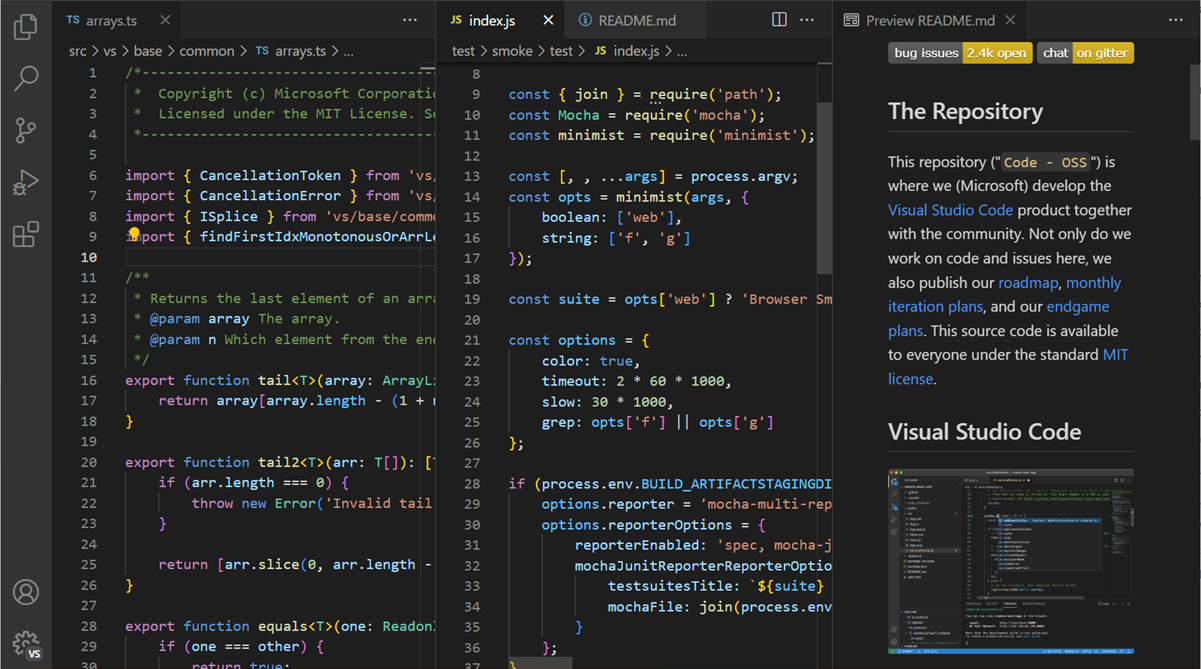
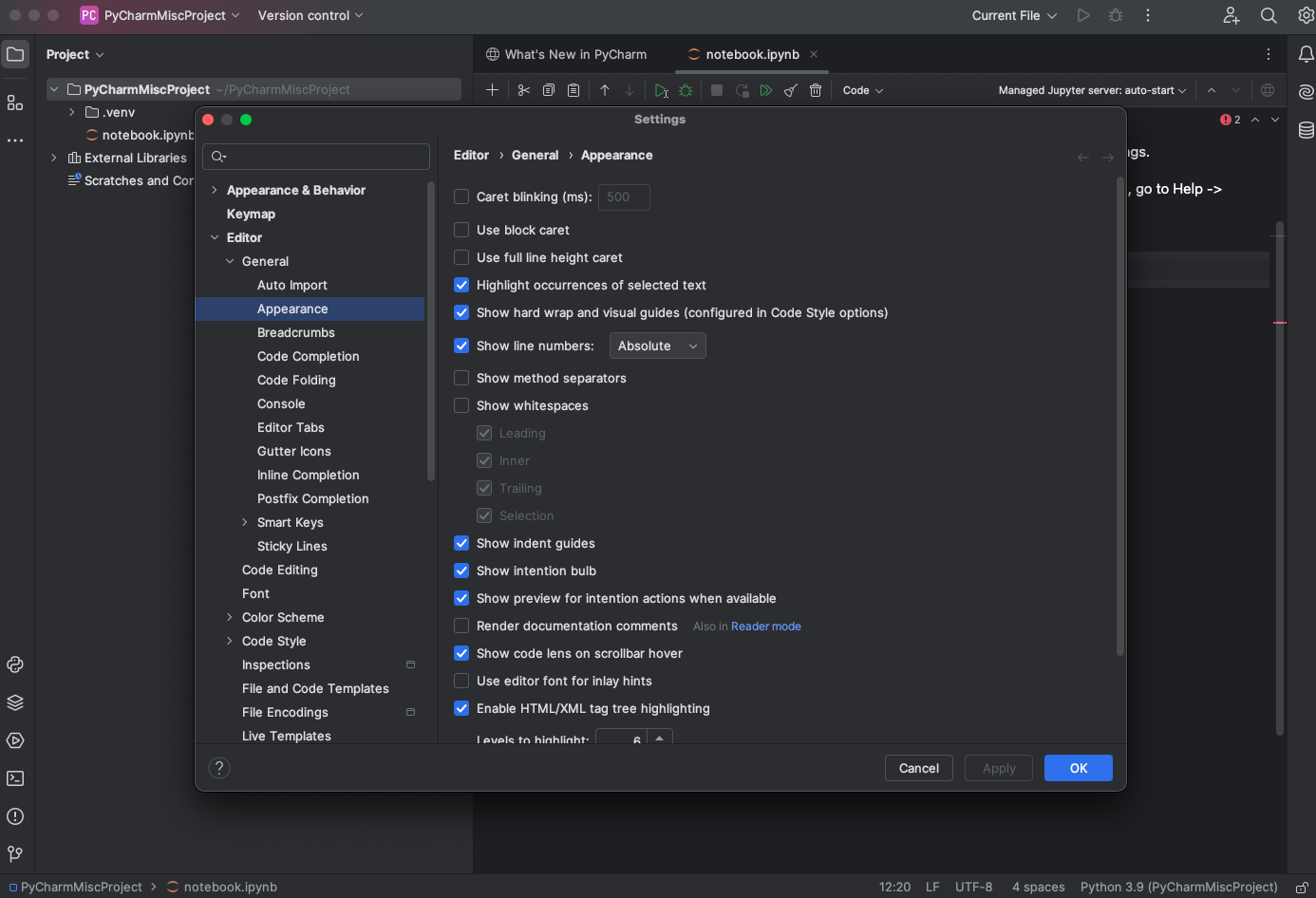
Several operating systems allow for some control over cursor blink rates, but IDEs and text editors like VS Code and Sublime Text have yet to offer built-in options for users who find the blinking cursor problematic. Until these features are standard, developers needing an accessible workspace are left with clunky workarounds, such as modifying system settings (where possible) or using third-party extensions—if they even exist for their preferred editor.

IF YOU HAVE A SENSORY DISORDER, AND WANT NO BLINKING CURSOR, PYCHARM IS AMAZING!

Conclusion

The lack of control over the blinking cursor in most development environments is a small yet significant oversight that highlights broader issues of ableist design in software. By incorporating accessibility-conscious choices, developers and tool designers can ensure that coding environments are truly inclusive for all. Until then, many neurodivergent and disabled developers will continue to struggle with an unnecessary and avoidable barrier to productivity.


January 31, 2025 0 comments
0 FacebookTwitterPinterestEmail
Dynamic illustration of Newton's Cradle showing motion and reflection concepts in physics.
Developer AccessibilityUI Accessibility

“Reduce Motion” Settings Often Fall Short for Accessibility Needs

by Sensory Diversity January 26, 2025
written by Sensory Diversity

The “Reduce Motion” setting, widely available in operating systems and browsers, is designed to minimize motion effects for individuals sensitive to visual stimuli. This feature aims to accommodate people with sensory processing disorders, vestibular disorders, and other conditions such as misophonia. While the idea is commendable, its implementation in most websites often misses the mark, leaving users with insufficient relief from motion-triggering elements.

The Illusion of Accessibility

When users enable “Reduce Motion,” they expect to see a noticeable reduction in animations, transitions, and other motion-based effects. However, many developers fail to fully implement this feature, resulting in a half-baked experience. Here are some common oversights:

  1. Loading Spinners and Progress Indicators
    Spinning icons or pulsating progress indicators are ubiquitous. While they might seem minor, these animations can be distressing for individuals with motion sensitivities. Developers often forget to replace them with static or subtle alternatives when “Reduce Motion” is enabled.
  2. Navigation Bars and Menus
    Sliding or bouncing navigation bars and dropdown menus often remain animated, despite user preferences. These rapid movements can be overwhelming and disorienting, exacerbating symptoms for those with vestibular disorders.
  3. Flickering Logos and Images
    Logos that flicker, pulse, or feature continuous motion are often overlooked in accessibility considerations. This can be particularly problematic for users with conditions like epilepsy or misophonia, where repetitive visual stimuli can be triggering.
  4. Rotating and Zooming Elements
    Rotating icons or zoom effects on hover are common UI features that developers rarely disable for “Reduce Motion” users. These effects may seem subtle but can contribute to sensory overload.
  5. Video Autoplay and GIFs
    Videos and GIFs often continue to autoplay, with fast-paced transitions or looping animations, ignoring the user’s desire to minimize motion.

The Consequences of Poor Implementation

For users with sensory, vestibular, or neurological conditions, unanticipated motion on websites can have serious consequences. These include:

  • Disorientation: Rapid or unexpected movements can cause dizziness and nausea.
  • Cognitive Fatigue: Constantly processing moving elements drains mental energy.
  • Emotional Distress: For individuals with misophonia, certain animations may trigger irritation or stress.
  • Barriers to Access: Poor motion reduction can make websites unusable, forcing users to abandon them.

How Developers Can Improve

Developers must recognize that “Reduce Motion” is not just a setting—it’s a necessity for some users. Here are steps to improve its implementation:

  1. Audit Motion Elements: Conduct thorough audits to identify all sources of motion, including spinners, transitions, and hover effects.
  2. Provide Alternatives: Replace animations with static indicators or fade transitions when “Reduce Motion” is enabled.
  3. Test for Accessibility: Use tools and user testing to ensure that motion-sensitive individuals can navigate your website comfortably.
  4. Comply with Standards: Follow accessibility guidelines like the Web Content Accessibility Guidelines (WCAG), which include recommendations for reducing motion.
  5. Educate Teams: Ensure developers, designers, and project managers understand the importance of this setting for accessibility.

Final Thoughts

The “Reduce Motion” setting has the potential to make the web more inclusive, but its current state leaves much to be desired. By taking a holistic approach to minimizing motion, developers can create truly accessible websites that respect the needs of all users.

January 26, 2025 0 comments
0 FacebookTwitterPinterestEmail
Screenshot 2025 01 19 at 01 11 16 Petition · Demand Accessible Gaming from Steam EA Nintendo PlayStation and Xbox Canada · Change.org
UI Accessibility

Demand Accessible Gaming from Steam, EA, Nintendo, PlayStation, and Xbox!

by Sensory Diversity January 19, 2025
written by Sensory Diversity

Gaming is a source of entertainment and connection for millions, but for many individuals with health conditions such as cybersickness, migraines, epilepsy, dizziness, nausea, misophonia, and sensory processing issues, playing can be uncomfortable, overwhelming, or even painful.

WHILE WE SPECIFICALLY CALL ON THE INDUSTRY GIANTS TO ENACT CHANGE, WE CALL ON THE GAMING INDUSTRY AS A WHOLE TO ENACT CHANGES. WHILE SOCIAL DIVERSITY HAS BEEN A MAJOR POINT OF INTEREST FOR GAMING COMPANIES, PHYSICAL DISABILITY HAS BEEN ENTIRELY NEGLECTED.

Modern games often contain flashing lights, rapid camera movements, loading spinners, beeping menus, text carets, dizzying effects, and other dynamic visuals that can trigger a range of negative symptoms. These elements, while designed to engage players, often have the opposite effect on those with specific health needs.

Health Conditions Affected by Current Game Design:

  • Autism or Sensory Processing Issues: Players with sensory processing disorders often struggle with overwhelming visual and auditory stimuli, making it difficult to enjoy games.
  • Cybersickness: Motion-heavy elements such as rapid screen transitions and moving cameras can cause nausea and dizziness.
  • Migraines: Bright, flashing lights and intense visual effects can trigger painful headaches.
  • Epilepsy: Flashing lights and rapidly changing visuals can cause seizures in those with photosensitive epilepsy.
  • Misophonia/misokinesia: Sound-sensitive players are negatively affected by beeping, clicking, or other intrusive sounds within UI elements.
  • ADHD: An inability to streamline processes in games, or choose paths can lead to many ADHD symptoms (including overstimulation).

We Demand the Following Changes to Improve Accessibility

  • True Reduced Motion Settings
  • Provide options to eliminate dynamic animations, excessive camera movements, and particle effects.
  • Allow players to toggle fixed camera angles to reduce dizziness or disorientation caused by motion-heavy gameplay.
  • Replace or allow users to disable loading spinners, as they are often a visual trigger for those with vestibular conditions
  • Sensory-Friendly UI Design
  • Provide options to adjust contrast, brightness, and saturation of UI elements to reduce visual overload.
  • Design calm, simplified visual interfaces that minimize intrusive animations and flashing.
  • Offer the ability to disable blinking or flashing elements, including achievement alerts and pop-up notifications, which are particularly problematic for people with photosensitive conditions or misophonia.
  • Less Intrusive Sounds
  • Allow users to turn off or customize beeping sounds, clicks, and other noises that may trigger misophonia or sensory sensitivities.
  • Provide adjustable sound options to ensure that the audio environment is comfortable for all players, especially in text-heavy menus.
  • Address Dizzying Effects
  • Offer options to disable screen shakes or dynamic camera transitions that can cause dizziness or motion sickness.
  • Allow for reduced motion effects in both menus and gameplay, such as slow-down or turn-off options for intense in-game movements.

These simple yet impactful changes will make gaming accessible to many individuals who currently face barriers due to their health conditions. It’s essential that game developers prioritize accessibility features, ensuring that everyone, regardless of their sensory or health needs, can enjoy gaming.

Join Us in Advocating for Change:
We call on Steam, EA, Nintendo, PlayStation, and Xbox to implement these essential accessibility features. Let’s make gaming a space that welcomes all players, regardless of their sensory needs or health conditions.

SIGN NOW https://www.change.org/p/demand-accessible-gaming-from-steam-ea-nintendo-playstation-and-xbox


PLEASE SHARE AFTER YOU SIGN!

January 19, 2025 0 comments
0 FacebookTwitterPinterestEmail
4453129
Misokinesia

Understanding Vestibular Fasting and Misokinesia: Impacts on Sensory Processing

by Sensory Diversity January 17, 2025
written by Sensory Diversity

In our technology-driven world, prolonged exposure to screens—such as computers and televisions—has become a daily norm. However, for individuals with certain sensory sensitivities, this constant engagement can lead to significant discomfort and distress. One such response is known as “vestibular fasting,” a term that describes the need to take breaks from visual stimuli to alleviate sensory overload. Accompanying this is misokinesia, a heightened sensitivity to the sight of repetitive, small movements, which can further exacerbate discomfort.

Vestibular Fasting: A Necessity for Sensory Relief

The term “vestibular fasting” refers to the practice of intentionally taking breaks from visual stimuli to prevent sensory overload. This approach is particularly beneficial for individuals who experience dizziness, nausea, or other symptoms when exposed to continuous visual input. By periodically disengaging from screens, individuals can help reset their sensory systems, reducing the risk of discomfort and promoting overall well-being (Alvarado et al., 2022).

Misokinesia: Sensitivity to Repetitive Movements

Misokinesia, often described as a “hatred of movements,” involves a strong negative emotional response to the sight of small, repetitive movements, such as someone fidgeting with their hands or feet. This sensitivity can lead to significant distress and social discomfort. Research indicates that approximately one-third of individuals may experience some degree of misokinesia, highlighting its prevalence and impact on daily life (Wells et al., 2021).

The Interplay Between Vestibular Fasting and Misokinesia

For individuals sensitive to both visual stimuli and repetitive movements, the combination of prolonged screen time and exposure to misokinetic triggers can be particularly challenging. Engaging in vestibular fasting—taking regular breaks from screens—can help mitigate the effects of misokinesia by reducing the overall sensory load. This practice allows individuals to manage their sensitivities more effectively, promoting a healthier interaction with technology (Boucher et al., 2020).

Peer-Reviewed Insights

A study published in Frontiers in Neuroscience explores the relationship between misophonia (a strong aversion to specific sounds) and sensory over-responsiveness (SOR). The research suggests that individuals with misophonia exhibit heightened sensory responsiveness, which may overlap with conditions like misokinesia. Understanding these sensitivities is crucial for developing effective coping strategies (Boucher et al., 2020).

Additionally, research on misokinesia indicates that this sensitivity is prevalent in the general population, with approximately one-third of individuals reporting some degree of sensitivity to repetitive movements. This finding underscores the importance of recognizing and addressing misokinesia in daily life (Wells et al., 2021).

Conclusion

Incorporating practices like vestibular fasting and being mindful of misokinesia can significantly enhance the quality of life for individuals with sensory sensitivities. By understanding and addressing these conditions, we can create more inclusive environments that accommodate the diverse sensory needs of all individuals.

References

Boucher, N., Tsaliki, E., & Ewing, P. (2020). Sensory processing, sensory overload, and coping mechanisms in individuals with misophonia and misokinesia. Frontiers in Neuroscience. https://doi.org/10.3389/fnins.2020.585485

Wells, K. S., Rodgers, L. S., & Henderson, D. C. (2021). Prevalence and implications of misokinesia in a general population. PMC. https://doi.org/10.3389/fpsyg.2021.709338

Alvarado, J. D., Valenzuela, R. L., & Paz, G. M. (2022). Vestibular fasting: Effects of periodic sensory disengagement in sensory processing disorders. Journal of Sensory Processing. https://doi.org/10.1002/jsp.5223

January 17, 2025 0 comments
0 FacebookTwitterPinterestEmail
3861958
MisokinesiaUI Accessibility

The Neglect of Accessibility in Tech: When Developers Are Dismissive and Rude

by Sensory Diversity January 17, 2025
written by Sensory Diversity

In an age where technology touches nearly every aspect of our lives, the issue of accessibility has never been more important. Yet, despite ongoing advocacy and growing awareness, many tech companies and developers continue to demonstrate a disturbing lack of concern for users with disabilities. Often, rather than addressing accessibility concerns with respect or a sense of urgency, these companies are rude, dismissive, and fail to understand that disabilities aren’t “preferences” to be disregarded.

As someone who works in a field that strives for inclusivity, I’ve encountered far too many situations where companies refuse to acknowledge or take seriously the needs of users with sensory disorders, mobility challenges, or other disabilities. My frustration isn’t just with poorly designed products—it’s with the dismissive attitudes of the developers themselves.

The All-Too-Common Dismissal of Accessibility Requests

When users with disabilities ask for features that would make their experience more comfortable, the responses are often shocking. Instead of working toward solutions, developers typically tell users to “just use something else” or “submit a feature request.” This shows a lack of empathy and understanding for the challenges faced by those with disabilities. The notion that accessibility is a “preference” undermines the very real, life-altering impacts that inaccessible design can have on users.

Two major companies come to mind when thinking about this behavior: Nintendo and Discord.

Nintendo: Accessibility “Doesn’t Matter”

Nintendo has long been celebrated for its innovative games, but when it comes to accessibility, the company’s approach has been less than accommodating. I’ve had personal experiences trying to engage with their products, only to find that critical features—like adjustable color contrasts, control remapping, or visual cues—are sorely lacking in many of their most popular titles.

When users reach out to Nintendo with accessibility requests, they’re often met with the same response: “Submit a feature request.” This response implies that accessibility is optional—something that can be requested, but not necessarily prioritized. It’s as if Nintendo’s team believes that those with disabilities should either adapt to their products or simply go without. In an industry that has embraced inclusive design in so many other areas, Nintendo’s reluctance to address accessibility is particularly frustrating.

Discord: “We’re Not Making That a Priority”

Discord, a widely used communication app, has also been a point of contention for many users with disabilities. The platform’s design and functionality don’t always account for sensory sensitivities, mobility challenges, or visual impairments. In fact, when users reach out to the Discord team for help with accessibility, the response is often far from helpful.

Rather than providing real solutions or even offering to look into the issue, users are typically told to “submit a feature request.” This form of dismissiveness is especially concerning when it comes from a company that prides itself on creating an inclusive space for users to communicate and interact. When accessibility is treated as a low priority, or when users are essentially told that their needs aren’t important enough to address, it sends a message that people with disabilities are not welcome.

The Rude Reality: Accessibility Is Not a “Nice-to-Have”

The problem isn’t just with the lack of features or thoughtfulness in design—it’s the refusal to acknowledge that disabilities are real and affect millions of people. Accessibility is not a “preference” like a color scheme or a fun feature; it’s a necessity. For many, it is the difference between using a product or not. Telling someone to simply “use something else” is not only inconsiderate—it’s exclusionary.

When developers respond with indifference or outright rudeness, they are sending a message that the needs of people with disabilities don’t matter. They are dismissing the reality that accessible design is not about luxury—it’s about ensuring that everyone has the same access to digital spaces and tools.

The Consequences of Ignoring Accessibility

When companies like Nintendo, Discord, and others fail to prioritize accessibility, they are actively excluding people from engaging with their platforms. This lack of inclusion leads to:

  • Frustration and Isolation: Users with disabilities are left feeling ignored and alienated.
  • Barriers to Participation: Individuals may feel that their only option is to avoid certain platforms altogether, limiting their access to entertainment, communication, or even work opportunities.
  • Lost Business: By not prioritizing accessibility, companies alienate a huge and growing segment of the market. The disability community represents billions of dollars in untapped potential, and ignoring them is a business misstep.

Moving Toward Inclusive Design: A Call for Change

As consumers and users, we have the power to demand better. We must continue to advocate for accessibility in all aspects of digital design, not as a “feature request,” but as a fundamental right. Companies that care about their users and their bottom line should prioritize accessibility as a core principle of their development process—not as an afterthought.

Developers and programmers need to understand that accessibility isn’t just about meeting legal requirements or ticking a box on a checklist. It’s about treating every user with dignity and respect, ensuring that technology is available to everyone, regardless of their abilities.

It’s time for companies like Nintendo, Discord, and others to take real action, to stop making excuses, and to understand that accessibility is not a “nice-to-have” feature—it’s a necessity. Until then, the tech industry will continue to alienate a significant portion of the population, creating unnecessary barriers for millions of users. The onus is on us to keep pushing for change, demanding better, and holding developers accountable for their actions—or inactions.

January 17, 2025 0 comments
0 FacebookTwitterPinterestEmail
Newer Posts
Older Posts

Sensory Diversity is the recognition that every individual perceives, filters, and responds to the world in a unique way. While neurodiversity celebrates the different ways we think, sensory diversity focuses on the gateway to those thoughts: our senses.

Social media infographics and posts are not a reflection of the views of the site owner or individual site authors. These posts come from a variety of sources and reflect numerous viewpoints through the sensory and neurodiversity community.

Recent Posts

  • Sensory Accessibility Suggestions for World of Warcraft
  • When It Isn’t ADHD or Autism: The Lost Tribe of Neurodivergence
  • What It’s Like Living With Misophonia
  • How Misophonia Actually Feels for Sufferers
  • What is Sensory Dysregulation?

Recent Comments

  1. Lilian on Misokinesia
  2. admin on Misokinesia
  3. Dense Caldwell on Misokinesia

Product links may be affiliate links. This site makes a small commission off these links.

  • Facebook
  • Instagram
  • Linkedin
  • Tumblr

@2021 - All Right Reserved. Designed and Developed by PenciDesign


Back To Top
Sensory Diversity
  • Home
  • Blog
  • Neurodivergence
    • What is Autism?
    • What is ADHD?
    • What is Sensory Integration / Sensory Processing Disorder?
    • What is Misophonia?
    • What is Misokinesia?
  • Sensory Lifestyle
  • Sensory DIY

Shopping Cart

Close

No products in the cart.

Close